
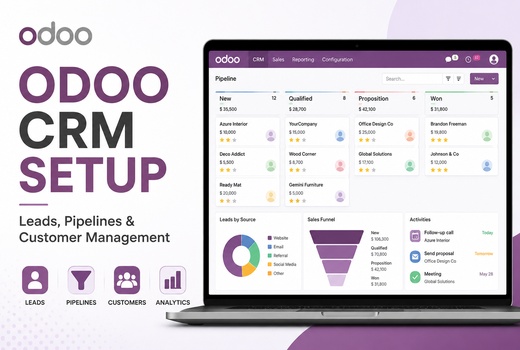


ODOO CRM Setup
Set up ODOO CRM for business teams with lead sources, customer fields, pipeline stages, activities, users, sales teams and CRM dashboard views.
 ODOO Partner
Logo Desire provides ODOO CRM setup for Australian businesses that need a clear CRM system for lead tracking, opportunity management, pipeline stages, follow-up activities, customer communication, sales automation and business workflow visibility.
We help you setup ODOO CRM for business, configure sales pipeline in ODOO, automate follow-ups with ODOO CRM, manage customer data and connect CRM with website enquiries, quotations, sales, invoicing, marketing and reporting.
Direct Answer
ODOO CRM is the customer relationship management module inside ODOO ERP. It helps businesses manage leads, opportunities, customer records, communication history, pipeline stages, sales activities, reminders, quotations, forecasting and CRM dashboards from one connected platform.
For an Australian business, ODOO CRM can become the control centre for sales and lead management. It can capture enquiries from your website, assign leads to sales users, track opportunities in ODOO CRM, organise follow-up activities, improve customer communication and connect qualified opportunities with quotations, sales orders, invoices and wider ERP workflows.
Logo Desire provides ODOO CRM setup as part of our broader ODOO ERP services, ODOO implementation services, ODOO website integration and business software development support.
Australia Focus
Many Australian businesses receive enquiries from websites, phone calls, emails, social media, referrals, ads and repeat customers. When those enquiries are stored in separate tools, sales teams can miss follow-ups, duplicate communication or lose track of important opportunities.
ODOO CRM for business solves this by bringing lead capture, opportunity management, customer communication, activity planning and reporting into one sales workflow. Managers can see active deals, overdue activities, expected revenue, lost reasons and team performance without asking for manual updates.
Logo Desire studies your current sales process before configuration. We review lead sources, pipeline stages, team roles, quotation flow, customer data requirements and reporting goals so the CRM supports your real daily work.
Countries Served
Logo Desire supports ODOO CRM setup, ODOO CRM implementation, ODOO CRM configuration, ODOO CRM customization, lead management, sales pipeline automation and CRM reporting for local and international teams through remote consultation and structured delivery.
Connected CRM
ODOO gives businesses a flexible ERP foundation where CRM, sales, invoicing, website forms, marketing, customer service and reporting can operate as one connected workflow.
ODOO is an open source business platform, making it suitable for configurable CRM workflows, custom fields, API connections, reporting dashboards and future module expansion.
Businesses can connect CRM activity with quotations, orders, invoices, website enquiries, support tickets, marketing campaigns and customer records inside ODOO.
A complete CRM setup helps sales managers, business owners and customer-facing teams work from the same lead, opportunity, communication and reporting data.
CRM Services
Logo Desire provides end-to-end ODOO CRM setup, implementation, configuration, customization, integration, reporting and consultation for businesses that need a reliable sales workflow.
Set up ODOO CRM for business teams with lead sources, customer fields, pipeline stages, activities, users, sales teams and CRM dashboard views.
Plan, structure, test and launch ODOO CRM with workflow mapping, sales process design, user guidance and practical go-live support.
Configure sales pipeline in ODOO with practical stages, lead priorities, activity types, assignment rules, permissions and reporting views.
Build a customized ODOO CRM workflow with custom fields, approval steps, sales stages, lead scoring, filters and business-specific forms.
Support ODOO lead management with lead capture, qualification, assignment, nurturing, follow-up tracking and lost reason analysis.
Create ODOO sales pipeline setup for lead and opportunity management in ODOO, helping your team move prospects from enquiry to conversion.
Implementation Process
ODOO CRM implementation is the process of planning, structuring, configuring, testing and launching the CRM for your sales team. A successful implementation starts with understanding how your business receives enquiries, qualifies leads, follows up, sends quotations and closes deals.
Logo Desire reviews your current sales process and converts it into a clear CRM workflow. This includes lead sources, opportunity stages, sales responsibilities, customer data fields, follow-up activities, reporting needs and future integration points.
For small businesses, ODOO CRM setup for small businesses can start with essential features and expand later as the team grows. This keeps the system simple, useful and scalable.
Configuration and Customization
ODOO CRM configuration for sales teams includes setting up the fields, stages, activities, access rules, dashboards and workflow settings your team needs. These settings help your team manage leads in ODOO CRM without confusion and give managers better control over sales activity.
ODOO CRM customization is useful when the standard CRM flow does not match your business process. A service provider may need enquiry type, service location and appointment date. A B2B company may need company size, decision-maker details, expected contract value and approval notes.
A customized ODOO CRM workflow improves lead nurturing, opportunity tracking, customer communication and sales forecasting because your team captures the right information at the right stage.
Lead and Pipeline Control
Logo Desire helps businesses organise lead capture, qualification, opportunity tracking, pipeline movement, follow-up activities and sales performance from one CRM system.
ODOO lead management records enquiries from website forms, landing pages, phone calls, referrals, social media, Google Ads, Meta Ads, email campaigns and manual entry.
With ODOO CRM lead nurturing, your team can track what the customer asked for, what was discussed, when the next follow-up is due and whether the lead should become an opportunity.
ODOO sales pipeline setup gives your sales team a visual process for opportunity management. Stages can include New Lead, Contacted, Qualified, Proposal Sent, Negotiation, Won and Lost.
When your team can track opportunities in ODOO CRM, it becomes easier to understand which deals need attention, which prospects are close to conversion and where delays are happening.
Sales pipeline automation with ODOO CRM helps teams respond faster and reduce missed opportunities. Automated activities can remind users to call, email, send a proposal or review a high-value opportunity.
You can automate follow-ups with ODOO CRM so every lead has a next action. This improves customer communication and keeps the sales process moving.
Logo Desire can help you connect leads, opportunities, pipeline stages, customer communication, sales activities, quotations, reports and business operations inside ODOO CRM.
Get ODOO CRM Consultation Book an AppointmentIntegration and Reporting
ODOO CRM integration connects your sales process with the rest of your business operations. A website enquiry can become a CRM lead, a qualified opportunity can become a quotation and a confirmed quotation can move into sales, invoicing, inventory, project management or support.
Logo Desire can connect ODOO CRM with website forms, marketing campaigns, landing pages, customer records, quotation workflows, email templates, reporting dashboards and other ODOO ERP modules.
Reporting is also part of a complete CRM setup. A CRM dashboard can show active leads, overdue activities, lead sources, conversion rates, sales team performance, expected revenue and lost reasons.
Business Types
Our ODOO CRM services can be configured for different sales models, from simple lead tracking to B2B opportunity management, consultation workflows, service enquiries and multi-team sales pipelines.
Manage enquiries, consultations, service requests, quotations, follow-ups and customer communication in one CRM workflow.
Track proposals, discovery calls, qualified opportunities, project handovers and recurring client communication.
Connect customer enquiries, website forms, product interest, repeat purchase follow-ups and sales activities.
Support account-based selling, decision-maker tracking, quotation follow-ups, expected revenue and pipeline forecasting.
Organise property enquiries, buyer interest, inspection follow-ups, appointment activities and sales opportunities.
Manage demos, support-led opportunities, implementation enquiries, subscription renewals and sales team reporting.
Launch Readiness
A successful CRM setup depends on clean customer data, clear lead sources, practical pipeline stages and consistent activity rules. Before launch, Logo Desire reviews existing spreadsheets, customer records, duplicate leads, contact details, opportunity values, sales stages, tags and user ownership.
We also test common CRM scenarios such as new enquiry capture, lead assignment, opportunity creation, activity scheduling, quotation follow-up, won opportunity, lost reason, email template use and dashboard reporting. Testing these workflows helps your team use ODOO CRM confidently after go-live.
After launch, the system can be improved with extra automation, better reporting, additional lead sources, email templates, website integrations, marketing attribution, customer segmentation or wider ERP connections.
CRM Roadmap
Logo Desire follows a structured process to plan, configure, test and launch ODOO CRM safely with clear workflow logic before your sales team starts using it.
We review your lead sources, sales stages, customer journey, quotation process, communication channels and reporting needs.
We define how leads, opportunities, activities, quotations, sales users and managers should work inside ODOO CRM.
We configure sales teams, stages, lead fields, activity types, access rights, assignment rules, tags and dashboard views.
We add custom fields, website form capture, campaign source tracking, email templates, quotation links and ERP connections where needed.
We test lead creation, opportunity movement, follow-up activities, notifications, reporting filters and manager dashboards.
We guide your team on daily CRM use, pipeline updates, activity management, customer records and sales reporting.
We provide troubleshooting, reporting updates, workflow improvements and future ODOO CRM customization support.
Service Highlights
Logo Desire follows a practical delivery model focused on sales process mapping, clean data, controlled testing, user training and post-launch improvement.
Remote ODOO CRM consultation, setup and support for Australia and international sales teams.
Practical CRM setup focused on daily sales workflows, not unnecessary technical complexity.
Leads, opportunities, pipeline stages, activities, customers, quotations, automation and reports.
Training, troubleshooting, workflow improvements, reporting changes and integration support.
CRM Consultation
An experienced ODOO CRM consultant helps your business avoid poor setup, unnecessary complexity, weak reporting and low user adoption. Many CRM systems fail because they are not designed around the actual sales process.
Our ODOO CRM consultation covers process review, module planning, pipeline design, lead management structure, automation options, reporting requirements, user roles and integration planning.
Whether you need end-to-end ODOO CRM setup, a new CRM implementation or improvement of an existing ODOO CRM system, Logo Desire can guide your business with a clear and practical approach.
Why Logo Desire
Logo Desire combines ODOO ERP knowledge, website integration, software development, automation and digital growth experience to create CRM systems that support real sales operations.
We configure ODOO CRM around your sales process, customer journey, team structure and reporting needs. The goal is to create a system your team can use every day.
We focus on useful CRM features such as lead tracking, opportunity management, follow-up activities, pipeline stages, customer communication and CRM dashboards.
Your CRM can start with sales and lead management, then expand into quotations, invoicing, projects, inventory, eCommerce, customer support and wider ERP operations.
Talk to Logo Desire about ODOO CRM setup, CRM implementation, sales pipeline configuration, lead management, automation, website lead capture, customer communication, reporting dashboards and business workflow integration.
ODOO CRM Tutorials
These tutorial cards help business owners and sales teams understand how ODOO CRM supports lead management, sales pipeline setup, customer communication, activities and reporting.
Watch how ODOO CRM supports lead capture, opportunity tracking, sales pipeline setup, customer communication and follow-up activities for sales teams.
Watch on YouTube →Learn how ODOO CRM helps sales teams capture leads, qualify prospects, manage opportunities and move deals through a clear sales pipeline.
Watch on YouTube →See how ODOO CRM activities help teams schedule calls, emails, meetings and reminders so follow-ups stay organised and visible.
Watch on YouTube →Client Feedback
Businesses choose Logo Desire for ODOO CRM services that connect real sales workflows with lead management, pipeline control, reporting and ERP operations.
“Logo Desire helped us move from spreadsheets to a clear ODOO CRM pipeline. Our leads, follow-ups and team activity are now easier to manage every day.”
“The CRM workflow was configured around how our sales team actually works. Lead assignment, activity reminders and reporting became much clearer after setup.”
“Logo Desire connected our website enquiries with ODOO CRM and created useful dashboards for our managers. The setup was practical and easy to understand.”
FAQs
Answers to common questions about ODOO CRM setup, implementation, configuration, customization, lead management, sales pipeline automation, integration and reporting.