ODOO logo Official Odoo Partner

Odoo Sales & Purchase Management Services in Australia & Worldwide

Logo Desire configures Odoo Sales Management, Odoo Purchase Management, quotations, customer orders, supplier purchases, inventory links, approvals, invoicing and reporting for Australian businesses.

Build an integrated sales and procurement platform that helps your team create sales quotations, confirm customer orders, manage supplier orders, compare vendor prices and monitor order status without relying on disconnected spreadsheets.

What Is Odoo Sales and Purchase Management?

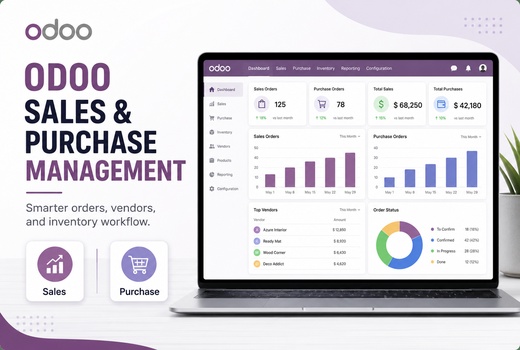
Odoo Sales and Purchase Management is a connected ERP process that controls customer quotations, sales orders, supplier requests, purchase orders, receipts, invoices, vendor bills and operational reporting from one database. It replaces repeated data entry by allowing approved information to move between sales, purchasing, inventory and accounting.

A confirmed customer order can reserve available stock, create a delivery requirement or trigger procurement. A supplier order can create an expected receipt, update stock availability and support vendor bill verification. This end-to-end order management structure gives sales, purchasing, warehouse and finance teams access to the same transaction status.

Logo Desire provides implementation, configuration, data migration, workflow automation, user training and ongoing support as part of our broader Odoo ERP services, Odoo CRM setup, ODOO accounting setup and ODOO inventory management solutions.

Odoo Sales and Purchase Support Across Australia, UK, USA, Canada & More

Logo Desire provides remote Odoo Sales Management, Odoo Purchase Management, procurement configuration, workflow automation, migration, training and integration for businesses across Australia and international markets. Each solution is adapted to the organisation's products, currencies, locations, approval structure and operating model.

Australia UK USA Canada Tanzania Uganda Rwanda Ethiopia Kenya Pakistan UAE Saudi Arabia Oman Qatar Malta Spain Sweden Other Regions

A Practical Sales and Purchasing System for Australian Businesses

Separate sales, purchasing and stock records create avoidable delays. A salesperson may promise an unavailable product, a buyer may order excess stock, or finance may receive an invoice without a verified purchase record. ODOO removes these gaps by connecting demand, supply and financial documents.

The platform supports wholesalers, distributors, retailers, manufacturers, service providers and eCommerce businesses. Teams can track sales activities, review customer commitments, automate purchase requests, control product costs and analyse sales and purchase performance using current operational data.

Real-time sales and purchase tracking also improves management decisions. Owners can see expected revenue, committed purchasing, pending deliveries, supplier lead times and order progress without waiting for manually prepared reports.
Key operational improvements

  • Reduce duplicate entry across sales, purchasing, inventory and finance.
  • Apply consistent prices, discounts, taxes and commercial terms.
  • Connect customer demand with stock availability and procurement.
  • Introduce purchase approval and control workflows.
  • Track ordered, delivered, received, invoiced and billed quantities.
  • Improve supplier, customer and product performance reporting.

Odoo Sales Management

Control the full customer journey from the first quotation to delivery, invoicing and performance analysis.

🧾

Odoo Quotation Management

Build a customer quotation system with branded templates, optional products, validity dates, payment terms, taxes and digital acceptance. Employees can create sales quotations quickly while using approved commercial information.

📦

Odoo Sales Order Management

Convert accepted quotations into confirmed orders without re-entering customer or product data. The sales order processing flow can reserve stock, create deliveries, schedule services or generate procurement demand.

⚙️

Odoo Sales Module

Configure sales teams, customer groups, units of measure, pricelists, discount permissions, taxes, payment terms, delivery methods and approval conditions around your actual selling process.

🏷️

Product Pricing Rules

Apply prices by customer, product, quantity, currency or campaign period. Controlled discount rules help protect margins while giving authorised employees the flexibility to negotiate.

🚚

Order Fulfilment Process

Link confirmed orders with stock reservations, picking, packing, delivery and backorders. Users can monitor order status and provide customers with more reliable fulfilment information.

💳

Sales Invoice Management

Generate invoices from ordered quantities, delivered quantities, timesheets, milestones or recurring services. The automated quotation-to-invoice workflow reduces missed billing and inconsistent invoice data.

Connect Customer Demand with Inventory and Procurement

Configure ODOO so sales orders, stock availability, supplier purchases, deliveries, invoices and vendor bills move through one controlled workflow.

Odoo Purchase Management

Purchasing teams need clear supplier information, current prices, approved quantities and expected delivery dates. ODOO centralises these details so employees can manage supplier orders and control commitments before vendor invoices reach the accounts team.

The automated procurement workflow can begin from a manual requirement, low-stock rule, customer order, manufacturing demand or scheduled replenishment. Managers can review the request before confirmation, preserving financial oversight while reducing routine administration.

Purchase records remain linked with receipts and vendor bills. This makes it easier to identify incomplete deliveries, price differences, excess billing or quantities that have not yet been received.

Purchase setup can include

  • Supplier contacts, product references, prices and lead times.
  • Requests for quotation and supplier comparison procedures.
  • Purchase approval limits by user, department or order value.
  • Receipt controls for ordered and delivered quantities.
  • Vendor bill policies and three-way matching.
  • Purchasing reports by supplier, product, buyer and company.

Supplier Ordering, Procurement and Cost Controls

Odoo Purchase Module

Configure supplier records, purchase taxes, payment terms, minimum order quantities, vendor pricelists, order templates and receipt policies. The module gives buyers a consistent method for creating compliant purchase documents.

Odoo Purchase Order Management

The purchase order processing workflow records approved quantities, negotiated prices, expected dates, taxes and responsible users. Orders can be emailed to suppliers and tracked until products or services are received.

Odoo Vendor Management

Store supplier contacts, purchase history, delivery lead times and product-specific agreements in one supplier and customer management system. Buyers can compare vendor prices and review previous performance before placing an order.

Odoo Procurement Management

Connect replenishment rules, stock forecasts, sales demand and manufacturing requirements. The inventory-connected procurement process helps purchase the required quantity at the appropriate time instead of relying on guesswork.

Supplier Price Management

Record supplier prices by product, quantity, currency and validity period. Buyers can compare commercial terms, while managers can assess the effect of purchase cost changes on inventory value and sales margins.

Vendor Bill Management

Match vendor bills with approved purchase orders and received quantities. This purchase approval and control workflow helps identify duplicate charges, unreceived goods and unauthorised price changes before payment.

Sales and Purchasing Integration

The greatest value comes from connecting commercial and operational records. A sales order can reserve available inventory, initiate dropshipping, trigger a purchase requirement or create a manufacturing demand. A purchase receipt can update availability for pending customer deliveries.

Integration with Odoo Accounting connects customer invoices, supplier bills, payment terms and financial reporting. Integration with Odoo Inventory Management connects stock forecasts, warehouse transfers, receipts and deliveries.

Multi-company sales and purchasing can separate transactions by Australian entity, branch or operating company while giving authorised managers consolidated visibility. Access rights ensure users only see and approve the records relevant to their responsibilities.

Integrated workflow outcomes

  • One record flow from quotation to invoice.
  • One procurement flow from requirement to vendor bill.
  • Current stock information for sales and purchasing users.
  • Fewer manual transfers between departments.
  • Clear responsibility for approvals and exceptions.
  • Consistent reporting across customers, suppliers and products.

Analyse Sales and Purchase Performance

Use current transaction data to evaluate revenue, purchasing commitments, supplier performance and product margins.

Sales Performance

Data-driven sales performance analysis can measure quotation conversion, revenue, average order value, salesperson activity, customer buying patterns and product profitability.

Purchase Performance

Review supplier spending, purchase price variation, order lead times, received quantities and vendor delivery reliability to improve sourcing decisions.

Operational Exceptions

Dashboards can highlight overdue quotations, delayed supplier orders, pending approvals, partial receipts, unbilled deliveries and unmatched vendor bills that require action.

How Different Businesses Use the Connected Workflow

The configuration should reflect how products, services, customers and suppliers move through your organisation.

🏬

Wholesale and Distribution

Wholesalers can manage customer-specific prices, bulk quantities, stock reservations, partial deliveries and supplier replenishment. Buyers can see upcoming demand before confirming orders, while sales teams can check availability before committing to delivery dates.

🏭

Manufacturing Businesses

Manufacturers can connect customer demand with bills of materials, component purchasing and production planning. Required materials can create procurement actions while finished products remain linked to the originating customer order.

🛒

Retail and eCommerce

Online and physical sales can share product, price and inventory information. Replenishment rules can respond to changing demand, and customer orders can move directly into warehouse fulfilment without separate manual entry.

🧰

Service Providers

Service companies can turn accepted quotations into projects, tasks, subscriptions or timesheet-based work. Purchases for subcontractors, equipment or project materials can remain connected with the relevant customer engagement.

🚢

Import and Trading Companies

Importers can record supplier currencies, lead times, minimum quantities and purchase commitments. Incoming stock can be monitored against customer demand, while accounting integration supports the financial treatment of purchases and related charges.

🏢

Multi-Branch Operations

Businesses with several branches can define sales teams, warehouses, purchasing responsibilities and approval limits by location. Management retains visibility over consolidated activity without removing local operating control.

Approval, Access and Transaction Controls

A connected system should improve control as well as speed. Logo Desire can define who may create, confirm, amend or cancel commercial documents. Permissions can separate sales, purchasing, warehouse and finance responsibilities so users complete their assigned tasks without gaining unnecessary access.

Approval conditions can be applied to discounts, low-margin quotations, high-value orders, non-standard supplier prices or purchases above a specified amount. Activities and notifications can direct exceptions to the responsible manager instead of delaying every routine transaction.

Consistent master data is equally important. Product codes, units of measure, taxes, customer terms, supplier details and price rules should be reviewed before migration. Clean records improve reporting and reduce errors after the system goes live.

Controls that can be configured

  • Role-based access for sales, buyers, warehouse and finance users.
  • Manager approval for high discounts or low-margin quotations.
  • Purchase authorisation limits based on order value.
  • Warnings for missing prices, unavailable stock or overdue actions.
  • Required fields for customer, supplier and product records.
  • Audit visibility for document status and responsible users.

Odoo Sales and Purchase Management Tutorials

Review practical Odoo tutorials covering quotations, customer orders, supplier RFQs, purchase orders and procurement workflows.

Sales

Odoo Sales Management Tutorials

Odoo Sales Tutorial: Sales Workflow and Quotations

Learn how Odoo supports customer quotations, sales orders and the connected sales workflow.

Watch on YouTube

Odoo Sales Tutorial: Customer Order Processing

Review practical customer order processing, confirmation and sales document management in Odoo.

Watch on YouTube

Odoo Sales Tutorial: Quotations and Sales Features

Explore quotation controls, product lines, pricing and sales features used by commercial teams.

Watch on YouTube
Purchases

Odoo Purchase Management Tutorials

Odoo Purchase Tutorial: Purchase Management Overview

Learn the main Odoo Purchase workflow for suppliers, RFQs, purchase orders and receipts.

Watch on YouTube

Odoo Purchase Tutorial: Supplier Orders and Procurement

See how supplier orders, procurement activities and purchasing records are managed in Odoo.

Watch on YouTube

Odoo Purchase Tutorial: RFQ and Purchase Order Controls

Review request-for-quotation, vendor comparison and purchase order control procedures.

Watch on YouTube

Our ODOO Sales and Purchase Implementation Process

We configure the system around your real users, documents, approvals, products and reporting requirements.

01

Process Review

We document how your team handles quotations, customer orders, suppliers, purchasing, receipts, invoices and approvals.

02

Solution Design

We define the required modules, roles, controls, integrations, reports and automation before configuration begins.

03

System Configuration

We configure products, customers, suppliers, pricing, taxes, documents, approval limits and operational workflows.

04

Data Migration

We clean, map and import agreed customer, vendor, product, price and opening operational data.

05

Workflow Testing

We test quotation, sales order, procurement, purchase order, receipt, delivery, invoice and vendor bill scenarios.

06

User Training

We provide role-based training for sales, purchasing, warehouse, finance and management users.

07

Go-Live Support

We support launch, correct configuration issues and refine practical workflows after users begin processing live transactions.

Why Choose Logo Desire?

Logo Desire provides ODOO implementation, customisation, integration, migration, training and support for Australian organisations. We focus on creating a usable commercial workflow rather than simply enabling standard modules.

Our team can configure the standard platform and extend it with custom fields, approval conditions, notifications, reports, API connections and role-specific controls. The result is a scalable Odoo sales and purchase solution that can support additional users, locations, products and companies.

Every implementation includes documented requirements and testing against realistic transactions. This helps ensure the final system reflects how your team sells, purchases, receives, delivers and records financial activity.

Our service scope

  • Business process review and solution design.
  • Sales, purchase, inventory and accounting configuration.
  • Customer, supplier, product and pricing data migration.
  • Document templates, approvals and workflow automation.
  • Custom dashboards, reports and external integrations.
  • User training, launch assistance and ongoing support.

Build a Controlled Sales and Procurement Workflow

Talk to Logo Desire about quotations, customer orders, supplier management, purchasing approvals, inventory integration, invoicing, vendor bills, reporting and workflow automation for your Australian business.

ODOO Sales & Purchase Management FAQs

Practical answers about sales orders, supplier purchasing, procurement, invoicing, approvals and implementation.

It manages customer quotations, sales orders, pricing, deliveries, invoicing and sales reporting within the Odoo ERP platform.
It manages supplier quotations, purchase orders, approvals, expected receipts, vendor bills and purchasing reports from one connected system.
Yes. A confirmed sales order can create procurement demand when stock is unavailable or when a product uses a make-to-order or dropshipping route.
Yes. Users can prepare branded quotations with approved products, prices, taxes, payment terms and optional items, then send them electronically for customer review.
Yes. Customer invoices can be generated from ordered quantities, delivered quantities, project milestones, timesheets or recurring service rules.
ODOO stores supplier-specific prices, minimum quantities, currencies and validity periods so buyers can compare cost and commercial terms before confirming an order.
Yes. Approval rules can be based on purchase value, responsible user, department or customised business conditions.
Yes. Purchase requirements can be generated from minimum stock rules, forecast demand, customer orders, manufacturing needs or scheduled replenishment.
Vendor bills can be checked against approved purchase orders and received quantities before validation, helping identify discrepancies or duplicate charges.
Yes. Sales and purchasing can be connected with stock held across multiple warehouses and internal locations.
Yes. Multi-company configuration can separate customers, suppliers, transactions, access rights and accounting records while supporting authorised consolidated reporting.
Yes. We can migrate agreed customer, supplier, product, price and selected transaction data after cleaning, mapping and validation.
Yes. Role-based training can be provided for sales, purchasing, warehouse, finance and management users.
Yes. We can add approval conditions, custom fields, document layouts, notifications, reports, dashboards and API integrations where standard functionality is insufficient.
The timeframe depends on the number of companies, users, products, integrations, migration volume and custom requirements. The implementation scope is confirmed after process review.
Book a consultation with Logo Desire so we can review your sales, purchasing, inventory and accounting requirements and define an implementation plan.