

Business Consultation
We discuss your business model, pain points, current systems, departments, users, and expected ERP outcomes.
 Implementation Services
Logo Desire provides structured Odoo Implementation Services for Australian businesses that need a connected, scalable and practical platform. We replace disconnected spreadsheets, outdated applications and repetitive manual work with one Odoo environment designed around your operations.
Our end-to-end Odoo implementation covers requirements analysis, gap analysis, module selection, database setup, configuration, ERP data migration, integrations, user acceptance testing, employee training, cloud deployment, go-live support and ongoing optimisation across Australia.
Direct Answer
ODOO implementation is the complete process of setting up ODOO ERP so it works according to your business operations. It includes understanding your workflow, selecting the right modules, configuring system settings, importing business data, setting user roles, testing each process, training staff, launching the ERP, and supporting the system after go-live.
In simple terms, ODOO implementation turns ODOO from a general ERP platform into a practical business system for your company. Its suite of open source business apps can help teams manage CRM, sales, accounting, inventory, purchases, HR, eCommerce, POS, projects, helpdesk, and reporting from one central platform. Logo Desire provides ODOO implementation services as part of our wider ODOO ERP services and software development capabilities.
Countries Served
Logo Desire supports remote requirements analysis, configuration, migration, testing, training, go-live assistance and post-implementation support for local and international organisations.
ERP Setup Matters
Many ERP problems do not come from the software itself. They come from weak planning, poor data quality, wrong module selection, unclear user roles, incomplete testing, or staff who were not trained properly. A business can buy the right ERP platform and still struggle if the implementation is not structured.
A proper ODOO setup ensures that your CRM pipeline reflects your sales process, your inventory module reflects your warehouse movement, your accounting setup matches your reporting needs, and your team understands how daily work should be completed inside the system. It also reduces duplicate work, manual spreadsheets, repeated data entry, reporting delays, and disconnected decision-making.
Logo Desire approaches ODOO setup as both a technical and business process. We review how your business currently works, identify gaps, recommend suitable modules, configure ODOO, support migration, test the system, and guide users before and after launch.
Implementation Roadmap
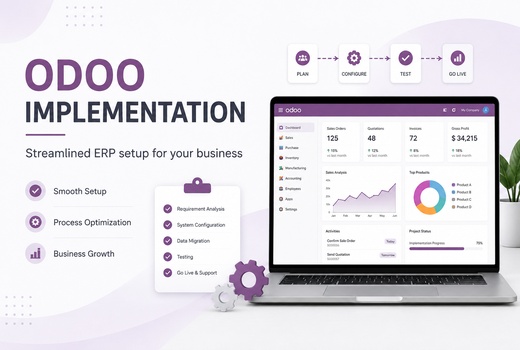
Logo Desire follows a clear implementation process so your ODOO ERP setup is planned, configured, tested, launched, and supported with minimum confusion.
We discuss your business model, pain points, current systems, departments, users, and expected ERP outcomes.
We document workflows, reports, approval needs, user roles, data sources, and integration requirements.
We recommend the right ODOO modules such as CRM, Sales, Accounting, Inventory, Purchase, HR, POS, or eCommerce.
We configure users, permissions, settings, products, taxes, workflows, templates, and module behaviour.
We clean, map, import, and validate data from Excel, old ERP systems, CRM tools, accounting software, and manual files.
We test workflows, reports, migrated data, user permissions, forms, integrations, and transaction processes.
We train administrators and users so your team can confidently operate the new ODOO ERP system.
We support launch activities, resolve issues, monitor usage, and help users transition to the live ERP setup.
We provide post-launch support, optimisation, troubleshooting, new module setup, and workflow improvements.
Estimated Delivery Time
Most projects take between 2 and 16+ weeks. The final schedule and Odoo implementation costs depend on module scope, data quality, integrations, custom development, user availability and approval speed.
One company, a small user group, standard CRM, Sales, Invoicing or basic Inventory, limited migration and no complex integration.
Several connected modules, structured data migration, user roles, reports, workflow configuration, testing and role-based training.
Multiple departments, larger datasets, accounting, inventory, purchase, projects, HR, eCommerce or POS with selected integrations.
Multiple companies or locations, complex approvals, manufacturing, custom modules, API integrations, phased deployment and extensive testing.
Delays usually occur when requirements are unclear, source data is incomplete, decision-makers are unavailable, customisation is approved late or user acceptance testing is postponed. Logo Desire reduces these risks through a documented Odoo implementation roadmap, milestone approvals and a phased ERP implementation plan.
Modules
Your ODOO setup can start with a few core modules or expand into a complete ERP system as your business grows.
Migration, Testing & Training
Implementation does not end at installation. Data quality, testing, training, and launch support are critical parts of a successful ODOO ERP setup.
Logo Desire can migrate data from Excel sheets, legacy ERP systems, CRM tools, accounting software, inventory files, product databases, customer lists, vendor records, invoices, and manual systems. Before import, we help review and structure data so it matches ODOO fields and business rules.
Testing is performed to confirm that records, reports, user roles, workflows, invoices, stock movement, sales orders, purchases, and integrations work correctly. This reduces launch risk and helps your team trust the new system.
ODOO implementation succeeds when your staff understand how to use the system in real daily tasks. We provide user training, administrator guidance, workflow explanation, and go-live assistance so your team can operate the ERP with confidence.
After launch, Logo Desire can support troubleshooting, workflow improvements, new module setup, reporting updates, user permission changes, integrations, and ongoing ERP optimisation. You can also combine implementation with our AI automation services and digital marketing services where required.
Australia-Focused ERP Delivery
Logo Desire combines business analysis, standard-first configuration, controlled customisation and structured change management to deliver an ERP environment that employees can use confidently.
A successful Odoo ERP deployment connects sales, purchasing, inventory, accounting, projects, employees and customer service through one reliable database. We begin with business requirement analysis to document current workflows, approval rules, reporting needs, transaction volumes and operational constraints.
Our consultants use module integration mapping to define how information moves between applications. A confirmed quotation can become a sales order, reserve stock, create a delivery, generate an invoice and update financial records without repeated data entry. This connected design improves visibility while preserving the controls required by managers and process owners.
Businesses should hire an Odoo implementation partner that understands operational design as well as system configuration. Logo Desire reviews your company structure, locations, users, existing applications, compliance requirements and future expansion plans before recommending modules or development.
A structured functional gap analysis compares required processes with standard Odoo capability. Standard functions are prioritised because they are easier to maintain and upgrade. Bespoke development is introduced only when an essential process cannot be handled reliably through configuration, approved apps or a suitable integration.
The Odoo implementation cost depends on selected modules, company structure, user numbers, data condition, integrations, reports, custom workflows, training and support requirements. A focused CRM or accounting project requires less effort than a multi-company rollout covering inventory, manufacturing, payroll, eCommerce and external platforms.
We provide a documented scope after discovery so responsibilities, deliverables and exclusions are clear. Early assessment also identifies data migration issues such as duplicate customers, inconsistent product codes, missing tax information or unreliable historical balances. Resolving these issues before production migration protects the schedule and reduces avoidable rework.
Effective ERP software implementation is a business transformation project rather than a software installation. We document how your organisation sells, buys, stores, delivers, invoices, approves and reports before designing the future-state workflow inside Odoo.
The legacy system transition is planned around business continuity. Existing systems may remain available during validation while approved records are migrated in controlled stages. A change management plan defines process ownership, communication, training, escalation and adoption responsibilities so employees understand both the new system and the reason for each change.
Our Odoo implementation methodology follows discovery, solution design, configuration, migration, integration, testing, training, launch and stabilisation. Each stage has defined deliverables and approval points, giving stakeholders clear visibility over progress and pending decisions.
Complex projects can use an Agile ERP deployment model, where high-priority functions are configured and reviewed in shorter cycles. A formal UAT testing phase then allows nominated users to test quotations, purchases, receipts, deliveries, invoices, permissions, reports and integrations against agreed acceptance criteria before production approval.
Reliable Odoo go-live support covers final migration, opening balance checks, user access verification, integration monitoring and assistance with critical transactions. Our team records launch issues, prioritises operational blockers and confirms that key workflows remain stable during the transition.
Practical user adoption strategies include role-based training, departmental champions, task checklists, guided practice, recorded demonstrations and refresher sessions. Adoption is measured through correct process completion, system usage and user feedback instead of assuming that one training session is sufficient.
Our Odoo setup and configuration service establishes company records, currencies, Australian tax settings, journals, warehouses, product categories, document sequences, email templates, CRM stages, approval controls, access rights and management dashboards. Each setting is linked to an approved operational requirement.
We configure roles so sales representatives, warehouse teams, accountants, managers and administrators receive suitable access without exposing unnecessary functions. Validation rules and approval limits can be applied to discounts, purchases, expenses, payments and other sensitive transactions.
A bespoke Odoo deployment is appropriate when standard configuration cannot support a documented operational need. Controlled customisation may add industry-specific fields, approval stages, calculations, reports, customer portals, supplier workflows, notifications or integrations with specialised applications.
Custom work is designed with maintainability and future upgrades in mind. We avoid changing standard behaviour without a clear business case, review dependencies before development and test each extension against the wider module environment before release.
A practical Odoo implementation roadmap defines objectives, modules, responsibilities, migration activities, integrations, testing, training, launch criteria and post-launch support. It gives management a single reference for project decisions and helps departments prepare for their involvement.
A phased rollout strategy can introduce CRM and Sales first, followed by Purchase, Inventory, Accounting, HR, POS or Manufacturing. This reduces operational risk, allows early feedback and gives users time to adapt before additional functions are introduced.
Odoo can support intelligent document processing, knowledge retrieval and service automation when these functions have a defined business purpose. An intent parser can identify the purpose of an enquiry, while Named Entity Recognition (NER) extracts customer names, product references, order numbers and locations. Schema validation confirms the required structure, and semantic matching connects different wording with relevant products, services or knowledge articles.
For larger text collections, topic modelling, syntactic parsing, text classification, stopword removal, lexical density checks and vectorization filtering can support cleaning, classification and retrieval. These methods are applied only where they improve the reliability of an operational workflow.
Retrieval-Augmented Generation (RAG) can ground responses in approved company documents. Agentic workflow automation can coordinate authorised multi-step actions, while few-shot prompting logic, context window sizing, a reviewed code-generation engine and suitable temperature controls improve consistency. Where specialised language is required, fine-tuned model weights may be considered. System prompt guardrails, synthetic test data creation and hallucination threshold monitoring provide additional controls before AI-supported processes are used in production.
Why Logo Desire
Logo Desire is an AI-powered digital agency and ODOO partner supporting businesses with ERP implementation, custom software development, website design, integration, automation, and digital growth. This combination allows us to look beyond a basic ERP setup and consider how ODOO should connect with your wider business technology ecosystem.
We can support ODOO setup, custom workflows, third-party APIs, website forms, eCommerce integration, payment gateways, business dashboards, data migration, staff training, and ongoing support. For businesses that require extra functionality, we can also provide custom software development and related Logo Desire services.
Client Reviews
Businesses choose Logo Desire for structured Odoo planning, configuration, migration, training and post-launch support. Our review score reflects feedback collected across completed client engagements.
Talk to Logo Desire about ODOO setup, module planning, configuration, migration, testing, training, launch support, and ongoing ERP improvements.
FAQs
Answers to common questions about ODOO implementation timelines, modules, data migration, and support.